

PHP2Shell: Critical Vulnerability in PHP – What to Do Now
Two critical security vulnerabilities in PHP put almost every PHP website at risk – from WordPress blogs to online stores. What’s behind PHP2Shell, what you should do now on shared hosting and on your own servers, and how to check whether your website has already been attacked.
 21 min read
 AI-generated
Contents
Status: October 22, 2026, 9:45 a.m. CEST. Since the night, CloudLinux has been providing fixed packages for all PHP versions from 5.2 to 8.5 (alt-php and ea-php, according to its status page). On the servers of my hosting clients, the vulnerability is closed – details in the box “For my hosting clients”. New: with my free plugin realmaker Security Quick Check, you can check your WordPress website for typical traces of a break-in. I’ll update this article as soon as there is new confirmed information.
In short
- Two vulnerabilities in PHP itself (CVE-2026-109618 and CVE-2026-109619) allow attackers, in the worst case, to run their own code on the server without any credentials.
- Practically all PHP versions are affected. The vulnerabilities are fixed in PHP 8.5.12, 8.4.27, 8.3.36 and 8.2.35, released on October 21, 2026.
- No WordPress update and no security plugin protects against it: the attack strikes before your website even starts.
- On shared hosting, it’s up to your hosting provider. On your own servers, it’s up to you – and right now.
What happened?
On October 20, 2026, the PHP team announced an emergency update for two critical security vulnerabilities. The details were actually supposed to be published two days later, but information had leaked in advance, and a video was already showing the attack chain. In a nod to the Log4Shell vulnerability of 2021, the whole thing quickly got a name: PHP2Shell.
On October 21, at around 4 p.m. German time, the fixed PHP versions were released. As early as that morning, Cloudflare had reported first attacks, and hosting providers reported attack attempts. With the update, the technical details became public too: the researchers who discovered the vulnerabilities have demonstrated attacks without login against current versions of WordPress, Drupal, Joomla, Nextcloud and Magento, among others. Germany’s Federal Office for Information Security (BSI) rated the situation at its second-highest warning level, “3 / Orange”, and considers widespread exploitation within a few hours of the updates’ release likely. Authorities and public institutions are taking their websites offline as a precaution – in the Netherlands, for example, the government login DigiD, the citizens’ portal MijnOverheid, the website of the parliament and that of the national cyber security center.
The reason for the stir: PHP is the foundation of a large part of the internet. According to W3Techs, it runs on 69.3% of websites whose server-side language can be identified – including all websites built with WordPress, TYPO3, Joomla, Shopware or Magento.
Why this vulnerability is different
Most of the security vulnerabilities I write about here are in WordPress plugins or themes. Then the solution is: update the plugin. PHP2Shell, by contrast, is in PHP itself – the language WordPress and most other systems are written in. The attack strikes the moment PHP accepts a request – before WordPress is even loaded.
This means:
- No security plugin helps. It never even gets a chance to run.
- WordPress maintenance mode doesn’t help either. PHP processes the request before WordPress checks whether maintenance mode is on.
- It doesn’t matter how well your website is maintained. A fully up-to-date WordPress installation is just as affected as an outdated one.
Only whoever runs PHP on the server can protect it: with the update – and until then, with settings at the server level.
If an attack succeeds, the attacker’s code runs with the web server’s permissions. The attacker can then do everything your website can do: read the database credentials from the configuration, steal customer data, modify files, plant backdoors or misuse your web space for spam and attacks on others. In addition, the vulnerabilities can be used to read parts of PHP’s memory, even without any foreign code running. That memory may contain passwords, session data and API keys from other requests.
The two vulnerabilities at a glance
| CVE-2026-109618 | CVE-2026-109619 | |
|---|---|---|
| Name given by the PHP team | RCE via OOM corruption | RCE via stale global state |
| What happens | If PHP runs out of memory while processing a request, it aborts while internal data is only half initialized. During cleanup, this invalid data is used anyway. | Internal state of a request survives even though its memory has already been freed. A later request to the same PHP process accesses it. |
| Typical trigger | crafted form and file uploads (multipart) that deliberately exhaust memory | an aborted request followed by a second one, among other things via the upload progress feature of PHP sessions |
| Rating (CVSS 4.0) | 9.2 – critical | 9.2 – critical |
According to the PHP team, the risk is highest with Apache and mod_php: there it was shown that a single request without login can trigger the attack before any of the website’s code runs. With PHP-FPM, LiteSpeed and other setups, attacks are harder but not ruled out – one of the two attack paths was also demonstrated against PHP-FPM.
Which PHP versions are affected
| PHP version | Support from the PHP team | Fixed in |
|---|---|---|
| 8.5 | yes | 8.5.12 |
| 8.4 | yes, security updates until December 31, 2028 | 8.4.27 |
| 8.3 | yes, security updates until December 31, 2027 | 8.3.36 |
| 8.2 | only until December 31, 2026 | 8.2.35 |
| 8.1 and older | no | no official update |
According to reports so far, older versions are vulnerable at least back to PHP 5.4. Because of the severity, the PHP team made an exception and provided minimal fixes as source code for PHP 7.4, 8.0 and 8.1 – for anyone who builds PHP themselves. Ready-made, patched versions of these are only available from Linux distributions, hosting providers and long-term support vendors.
Important: Distributions such as Debian, Ubuntu or Red Hat and many hosting providers build fixes into their existing packages without raising the version number. A number like “8.2.28” may then be patched – or not. What counts is your vendor’s security advisory.
Shared hosting: what you should do now
Most small business websites are on shared hosting: many customers share a server that the hosting provider manages. You can’t update PHP there yourself – your hosting provider has to do that. Your own tasks still matter:
Ask your hosting provider
Check your hosting provider’s status page or blog, or ask directly: Has PHP been updated on all servers, including the version my website uses? Which interim measures apply until then?
Don’t undo protective measures
Some hosting providers have centrally disabled PHP’s upload progress feature (
session.upload_progress). Don’t turn it back on via your own.user.iniorphp.iniin your web space. Uploads keep working; only PHP’s built-in progress indicator goes away – and WordPress, TYPO3 and co. don’t use it anyway. If your hosting provider temporarily blocks file uploads through websites until the update, upload files via SFTP or the file manager in the meantime.Switch to a supported PHP version
If your website still runs on PHP 8.1 or older, it’s only protected if your hosting provider backports the fix itself. Switch to PHP 8.3 or 8.4 in your control panel – with a backup first, and ideally on a test copy first. PHP 8.2 only gets security updates until the end of the year.
Secure a clean backup
Download a complete backup (files and database) now that was created before October 20. Many hosting providers keep backups for only 14 or 30 days. If it later turns out that your website was attacked, you’ll need a version from before the attack.
Keep an eye on your website over the next few days
How to do that is explained further below.
Of course, keep updating WordPress, plugins and themes as usual. But that doesn’t help against PHP2Shell itself.
For my hosting clients
The websites I host for clients run on servers of my hosting partner in Germany, which operates the servers technically. There, the vulnerability has been closed since the night (as of October 22, 9:45 a.m. CEST):
- PHP updates installed: My partner installed the fixed packages from CloudLinux (alt-php) and cPanel (ea-php) server by server, including for older versions such as PHP 7.4. Since 2:15 a.m., all servers have been updated and checked.
- Uploads work again: Since the afternoon of October 21, additional rules on all servers had intercepted attack requests and also blocked file uploads through websites. At 2:25 a.m., my partner switched them off. Forms and file uploads work as usual again.
- Password protection lifted: Until the update, after consulting with my clients, I had placed directory protection on the web directories, so requests without credentials never reached PHP. I removed it again on the morning of October 22. All client websites and realmaker.de are reachable as usual again.
- Upload progress stays off for now: My partner had already disabled PHP’s upload progress feature on the morning of October 21, before the details were published. This setting remains in place.
You don’t need to do anything. Just please don’t change any PHP settings related to upload progress.
Your own servers: what operators need to do now
If you run your own server, a VPS or containers with PHP, the responsibility is yours. And time is pressing.
1. Find all PHP installations
Don’t just think of the web server of your main website. PHP is also in test environments, containers, internal tools, and in appliances and products such as Nextcloud, pfSense or OPNsense. The Dutch National Cyber Security Centre maintains a list of products containing PHP that may be affected.
2. Update PHP – and restart all PHP processes
Install your distribution’s updates and compare the package version with its security advisory (for example in the Debian Security Tracker or on the Ubuntu CVE page). The restart is crucial: running PHP processes keep the old, vulnerable code in memory until they restart.
# Debian / Ubuntu
sudo apt update && sudo apt upgrade
# Restart PHP-FPM (adjust the version number)
sudo systemctl restart php8.3-fpm
# with Apache and mod_php
sudo systemctl restart apache2

# Red Hat, AlmaLinux, Rocky Linux
sudo dnf upgrade 'php*'
sudo systemctl restart php-fpm httpd
Three special cases:
- Remi repository: According to the PHP team, anyone getting PHP from the volunteer-maintained repository rpms.remirepo.net had no updates yet on October 21. The PHP team advises switching to the distribution’s packages or building PHP yourself.
- Containers: Images containing PHP must be rebuilt with an up-to-date base image and redeployed (
docker build --pull …). - Self-built: The source code of PHP 8.5.12, 8.4.27, 8.3.36 and 8.2.35 is available on php.net; the fixes for 7.4, 8.0 and 8.1 are linked in the PHP team’s security advisory.
3. Check that the update really took effect
php -v only shows the command-line PHP. Your web server may use a different one. So check the installed packages:
# Debian / Ubuntu
dpkg -l 'php*' | grep ^ii

# Red Hat, AlmaLinux, Rocky Linux
rpm -qa 'php*'
Which PHP version a WordPress website actually uses is shown in the backend under “Tools → Site Health → Info → Server”.
4. If you can’t update right away
The PHP team lists interim measures. They reduce the risk for certain attack paths, but they do not make an installation safe. Set the values in php.ini, in conf.d or in the FPM pool configuration – not via ini_set() or .user.ini, because those take effect too late – and then restart all PHP processes.
; php.ini or conf.d
session.upload_progress.enabled = 0
; 32M if uploads are needed
post_max_size = 8M
; always smaller than post_max_size
upload_max_filesize = 6M
; PHP 8.5 only
fatal_error_backtraces = 0

; or in the FPM pool, e.g. in
; /etc/php/8.3/fpm/pool.d/www.conf
php_admin_flag[session.upload_progress.enabled] = off
The PHP team also recommends setting memory_limit to -1 at the administrative level against the first vulnerability. This takes away the predictable memory limit an attacker relies on, but opens another door: a single request can then use up all the memory. Only do this together with a memory limit for the service or container (cgroup), and don’t use ulimit limits such as RLIMIT_AS for this – they trigger exactly the vulnerable path.
Where no file uploads are needed, you can reject multipart requests right at the web server. However, this breaks every upload and some forms – afterwards, test your media library, contact forms with attachments and checkout.
# nginx: in every server block that passes requests to PHP
if ($http_content_type ~* "multipart") {
    return 403;
}
# Apache: in every VirtualHost with PHP
RewriteEngine On
RewriteCond %{HTTP:Content-Type} multipart [NC]
RewriteRule ^ - [F]A web application firewall in front of the server can intercept known attack patterns. Cloudflare has rolled out rules for this for all customers, including the free plan. But that only helps if your server accepts requests exclusively from Cloudflare – otherwise attackers bypass the protection via the server’s IP address.
The last resort: take the server offline until the update is installed. The BSI, CERT-EU and the UK’s NCSC explicitly recommend this if you can’t update quickly.
5. Afterwards: the lessons learned
- Replace mod_php. According to the PHP team, the risk is highest with Apache and mod_php. If you still use it, switch to PHP-FPM.
- Keep upload progress off. The PHP team considers it wise to keep
session.upload_progressdisabled after the update as well if you don’t need it – attackers will now scrutinize this rarely used feature. - Move to supported versions. PHP 8.2 reaches end of life on December 31, 2026. Plan the switch to 8.3 or 8.4 now.
- Plan for emergencies. Who installs a critical update within hours in your organization – even on a weekend? That question should be answered before the next vulnerability.
How to check whether you’ve already been attacked
To be honest up front: according to the BSI, there are no confirmed indicators of compromise for PHP2Shell yet (as of October 21). Lists circulating online are unverified. And the PHP team stresses: the absence of suspicious log entries is no proof that nothing happened.
What you can check, though, is what a successful attacker typically leaves behind: new or modified files, new users, scheduled tasks, spam and redirects. Look at everything that has happened since October 20, 2026.
On shared hosting (without server access)
Checking for traces of an attack – without server access
Check for free: the realmaker Security Quick Check
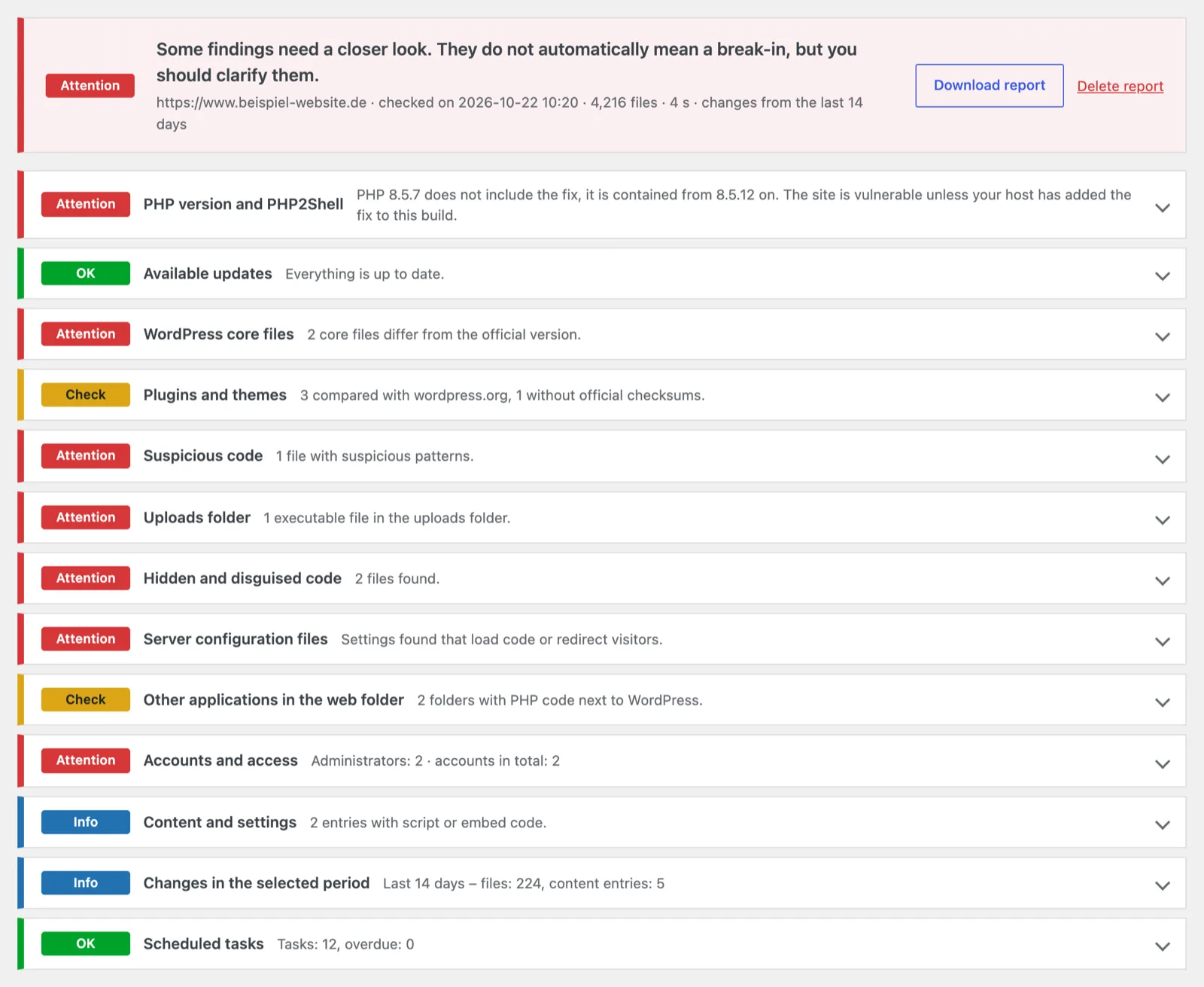
Checking by hand takes time, and some things are hard to spot in a file manager. That’s why I wrote a small, free WordPress plugin that covers the most important points of this list in one go: the realmaker Security Quick Check. It isn’t a full security scanner or a paid product, but a tool for a quick first assessment.
What the plugin checks:
- PHP version: does it contain the PHP2Shell fix? If the version number is lower, the plugin also looks at the build date. This shows whether your hosting provider has probably added the fix afterwards.
- WordPress files and plugins: compared with the official checksums from wordpress.org, so changed or unknown files stand out.
- Suspicious code: typical patterns of backdoors and web shells in all other PHP files, PHP files in the uploads folder, hidden files and PHP code hidden inside images.
- Server settings: entries in
.htaccess,.user.iniandphp.inithat attackers use to load code or redirect visitors. - Forgotten leftovers: old installations, test copies and other PHP applications in the web folder, and whether they can be reached from the internet.
- Access: all administrators and application passwords, read directly from the database, so hidden accounts show up too.
- Content and tasks: injected scripts in posts and settings, scheduled tasks and everything that changed in a period you choose.
For every point, the report shows a rating (“Attention”, “Check”, “Info”, “OK”), a short explanation and what you can do. You can download it as a text file, for example for your web agency.
What the plugin does not do:
- It changes nothing. It only reads; it doesn’t delete, repair or move any files.
- It is no proof. “Nothing found” is a good sign, but no guarantee. Malware on a site that has already been taken over can hide from tools running inside the same site.
- It can’t compare everything. Premium plugins, custom plugins and themes have no official checksums. The search for suspicious code still covers them.
How to use it:
Download
Download the plugin as a ZIP file (96 KB, version 1.0.0, for WordPress 6.3+ and PHP 7.4+).
Install
In WordPress, go to “Plugins → Add Plugin → Upload Plugin”, choose the ZIP file, then install and activate the plugin. If your hosting provider is currently blocking file uploads because of PHP2Shell, this won’t work. In that case, unzip the file and upload the
realmaker-security-quick-checkfolder towp-content/pluginsvia SFTP or the file manager.Start the check
Under “Tools → Security Quick Check”, click “Start check”. Depending on the size of the website, this takes a few seconds to a few minutes.
Read the report
Go through the report. If you no longer need the plugin, simply delete it; this also removes the stored report.
The check itself also works while your hosting provider temporarily blocks file uploads because of PHP2Shell. For the comparison, the plugin only sends the WordPress version and language and the names and versions of your plugins to wordpress.org; nothing else leaves your website. It’s free, needs no sign-up and is licensed under the GPL.
If the report shows something suspicious: not everything is a break-in – a plugin file you modified yourself, for example, is harmless. Still, don’t delete anything in a hurry. First save the current state, even if it may be infected, because it helps with the investigation later. Get support if you’re unsure. I’m happy to go through the report with you – get in touch.
On your own servers
With command-line access, you can search more thoroughly. The paths are examples for Debian and Ubuntu (web server user www-data); on Red Hat and similar systems they are, for example, /var/log/httpd and apache.
# PHP files created or modified since October 20.
# -newerct uses the file system change time, which an attacker
# cannot simply backdate (unlike the visible date).
sudo find /var/www -type f -name '*.php*' -newerct '2026-10-20' -ls

# PHP files in upload folders – they do not belong there
sudo find /var/www -type f -path '*/uploads/*' -name '*.php*' -ls

# Processes, cron jobs and files of the web server user
ps -u www-data -o pid,lstart,cmd
sudo crontab -l -u www-data
sudo find /tmp /var/tmp /dev/shm -user www-data -type f -ls

# Open network connections of PHP and the web server
sudo ss -tpn | grep -E 'php|apache|httpd|nginx'
In the logs, these entries indicate attack attempts – not a successful break-in, but a reason to look more closely. The PHP team names memory errors, fatal PHP errors and timeouts, especially when they pile up before the actual script runs. Crashed PHP processes also fit the picture, because a failed attack on a memory vulnerability often crashes the process.
# Crashed PHP and Apache processes
sudo grep -E 'Segmentation fault|SIGSEGV' /var/log/apache2/error.log* /var/log/php*-fpm.log*

# Memory errors, fatal errors and timeouts
sudo grep -E 'Allowed memory size|PHP Fatal error|Maximum execution time' /var/log/apache2/error.log* /var/log/php*-fpm.log*

# POST requests by sender, address and status
sudo awk '$6 == "\"POST"' /var/log/apache2/access.log | awk '{print $1, $7, $9}' | sort | uniq -c | sort -rn | head -30
If you find such traces, treat the server as potentially compromised and change the credentials stored on it as a precaution, for example for the database, APIs and payment providers. The vulnerabilities can also be used to read memory without modifying any files.
For WordPress websites, it’s also worth comparing against the original files with WP-CLI:
# WordPress core unchanged?
wp core verify-checksums

# Plugins from wordpress.org unchanged?
wp plugin verify-checksums --all

# Do you recognize all administrators?
wp user list --role=administrator
The checksums only cover files available on wordpress.org. You’ll have to inspect premium plugins, your theme, the uploads and wp-config.php yourself.
If you find something
Don’t rush to delete anything
First save logs and suspicious files. They show what happened and since when.
Take the website offline
Or have it replaced with a static maintenance page. On shared hosting, your hosting provider can help.
Secure PHP first, then clean up
Otherwise the attacker will get right back in.
Restore a backup from before the attack
If in doubt, from before October 20. Only removing malicious code is risky, because backdoors are easily overlooked.
Change all credentials
Hosting account, SFTP, database, all WordPress administrators, API keys in the configuration. For WordPress, also regenerate the security keys (“salts”) in
wp-config.php.Check data protection obligations
If personal data may have leaked, such as customer accounts or orders, you generally have to report this to the data protection supervisory authority within 72 hours (Art. 33 GDPR), and in some cases inform the people affected.
Get help if you’re unsure
An incompletely cleaned server is more dangerous than one that is known to be compromised.
Conclusion
PHP2Shell is one of the most severe PHP vulnerabilities in recent years, because it affects almost every PHP website – no matter which system runs on it or how well it’s maintained. The good news: the fix is out. On shared hosting, your hosting provider takes care of it; on your own servers, you need to act fast now. For everyone: don’t undo protective measures, secure a clean backup from before October 20, and keep an eye on your website over the next few days.
How I generally deal with critical vulnerabilities is described in the article Detecting and fixing critical vulnerabilities promptly. What ongoing support involves beyond that is covered in the article on the WordPress maintenance contract.
Sources: PHP team security advisory · CVE-2026-109618 (GitHub) · CVE-2026-109619 (GitHub) · BSI warning · CERT-EU · NCSC UK · Sansec · Patchstack (all accessed on October 21, 2026)
Frequently asked questions about PHP2Shell
Is my WordPress website affected?
If it runs on a PHP version without the fix: yes – regardless of the WordPress version and plugins. Whether the server is patched is something your hosting provider, or whoever runs your server, will know.
Does a security plugin help?
No. The attack strikes before WordPress, and therefore any plugin, is loaded. Only the PHP update on the server protects you.
Do file uploads still work when upload progress is disabled?
Yes. Only PHP’s built-in progress indicator is disabled. WordPress, TYPO3, Joomla and the common online stores don’t use it. However, some hosting providers additionally block uploads through websites until the update. My hosting partner lifted this block after the update on October 22 at 2:25 a.m. (see above).
Is it enough to disable upload progress?
No. That blocks one of the confirmed attack paths, but not all of them. Only the PHP update gives full protection.
I’m still on PHP 7.4 – what now?
The PHP project doesn’t provide a ready-made update for it. You’re only protected if your hosting provider or your distribution backports the fix. Ask them – and plan the switch to PHP 8.3 or 8.4.
How can I tell whether my hosting provider has installed the update?
The safest way is to ask. The PHP version in the WordPress backend gives a hint, but it isn’t always conclusive, because many vendors build fixes into older version numbers.
Michael Rademacher
Founder of realmaker
Michael Rademacher founded realmaker in 2003. He develops WordPress websites and software, produces films and live streams, and writes here about what he learns in client projects.
About Michael
Rather have it maintained?
Updates, backups and monitoring are handled by wp-einfach.de – for a fixed monthly price (service in German).