

realmaker Security Quick Check: Check WordPress for Signs of a Break-In – for Free
Since the PHP vulnerability PHP2Shell, many website owners have been asking: has my WordPress website already been attacked? My free plugin realmaker Security Quick Check gives you a first answer within minutes. What it checks, how to use it and where its limits are.
 10 min read
 AI-generated
Contents
Version 1.0.1 of October 22, 2026 · for WordPress 6.3+ and PHP 7.4+ · free, licensed under the GPL
In short
- A small WordPress plugin that checks your website for typical traces of a break-in in one go: in 13 areas, from the PHP version to hidden administrators.
- It only reads and changes nothing. For every point, the report shows a rating, a short explanation and what you can do.
- Free, no sign-up, in English and German: download the plugin.
- It doesn’t replace a full security scanner and is no proof that a website is clean.
Why I wrote the plugin
On October 21, 2026, two critical vulnerabilities in PHP itself became known as PHP2Shell. They affect practically every PHP website, and no WordPress plugin protects against them. What’s behind them and what to do is covered in my article PHP2Shell: Critical Vulnerability in PHP – What to Do Now.
Since then, many website owners have been asking: has my website already been attacked? Checking this by hand is tedious: sorting files by date, going through users, reading .htaccess, searching the uploads folder. And some things you can’t see in a file manager at all, such as an administrator hidden from the user list, or PHP code tucked away inside an image file.
That’s why I packed the most important checks into a small plugin. It isn’t a paid product or a full security scanner, but a tool for a quick first assessment. I tried it on realmaker.de and on a test site into which I deliberately planted typical traces of a break-in.
What the Quick Check covers
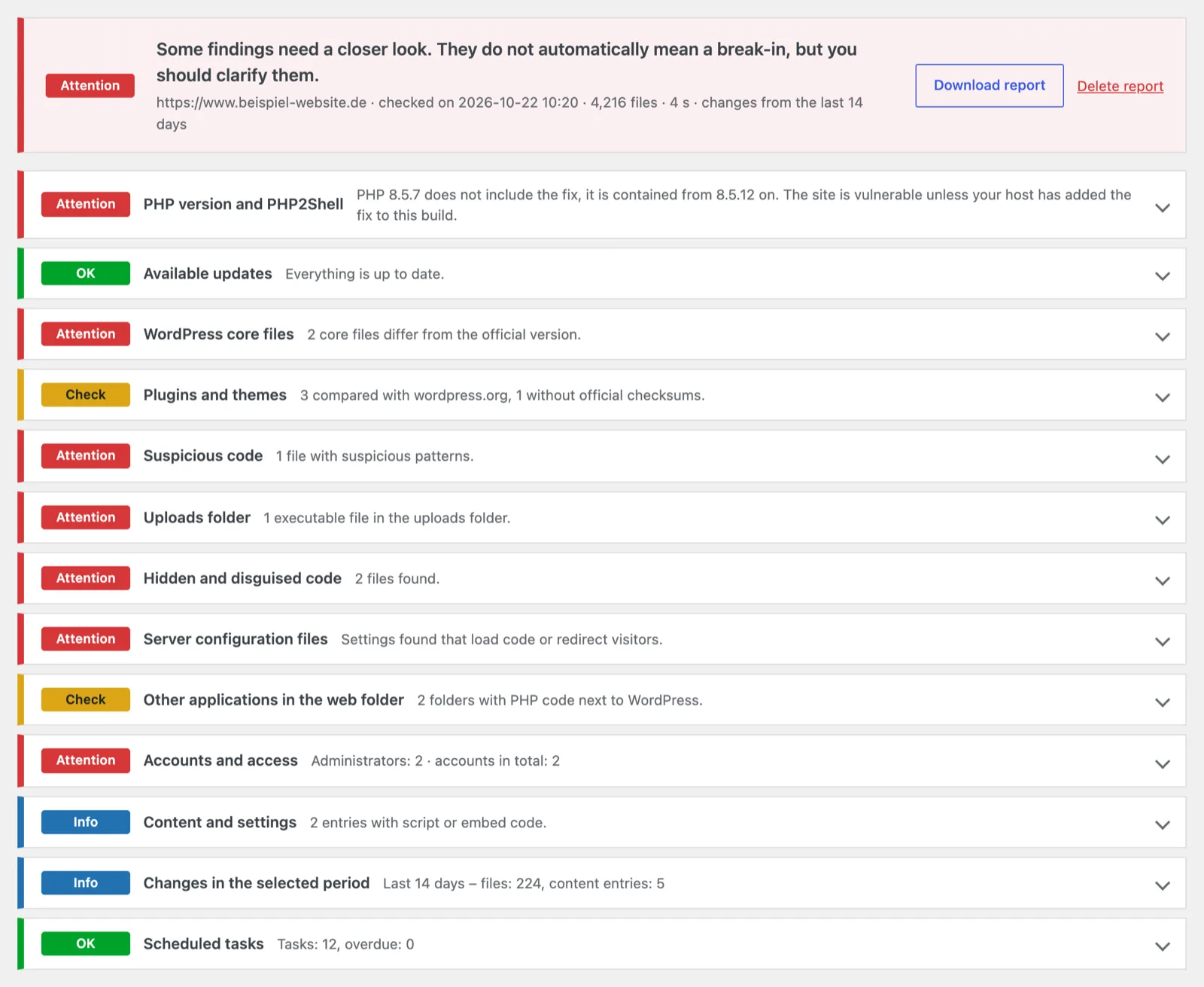
The report is divided into 13 areas. Files confirmed by the official checksums from wordpress.org are skipped by the search for suspicious code. That keeps the report manageable.
| Area | What is checked |
|---|---|
| PHP version and PHP2Shell | Does your PHP version include the fix (from 8.2.35, 8.3.36, 8.4.27 and 8.5.12)? If the number is older, the plugin looks at the build date: a build from October 20, 2026 onwards suggests that your hosting provider has added the fix. Hosting providers that have confirmed this for all their servers are recognized by the server name, and the check then shows green. Also: server name, server API, upload progress on or off, end of support. |
| Available updates | Updates for WordPress, plugins and themes according to the last update check. If that check is more than three days old, the plugin points this out. |
| WordPress core files | Every WordPress file compared with the official checksums (in your site’s language and in English). Also unknown files in wp-admin and wp-includes and additional files in the main folder. |
| Plugins and themes | Plugins from wordpress.org compared with their checksums, with changed and unknown PHP files. Also must-use plugins, drop-ins and plugins listed as active but missing. Themes are listed but can’t be compared. |
| Suspicious code | All other PHP files, checked for typical patterns of backdoors and web shells, such as eval with encoded code or commands taken from request data. |
| Uploads folder | PHP files and other executable files in the uploads folder. Empty index.php files and template caches (from WPML, for example) count as normal. |
| Hidden and disguised code | PHP files whose name starts with a dot, and PHP code inside images or inside text and SVG files in the uploads folder. |
| Server configuration files | .htaccess, .user.ini and php.ini: entries that load code before every request, run images as PHP or redirect visitors to other addresses. Known firewalls appear as info only. |
| Other applications in the web folder | Folders with PHP code next to WordPress, such as old installations and test copies, and whether they can be reached from the internet. |
| Accounts and access | All administrators, read directly from the database, new accounts in the selected period, application passwords and open registration. |
| Content and settings | Scripts, iframes and suspicious code in posts, pages and settings. |
| Changes in the selected period | Changed PHP, script and configuration files (without confirmed files and caches) and changed content. |
| Scheduled tasks | All scheduled WordPress tasks with their next run; overdue tasks are marked. |
A detail for the technically minded: as a file’s change time, the plugin takes the later of two timestamps. An attacker can backdate the visible modification date, but not the file system’s change time so easily.
What the report looks like
At the top is an overall rating, followed by the 13 areas with their rating: “Attention” (red), “Check” (yellow), “Info” (blue) and “OK” (green). Areas marked “Attention” or “Check” are already expanded; you open the others with a click. Each area briefly explains what it is about, lists the findings with their date and tells you what you can do.
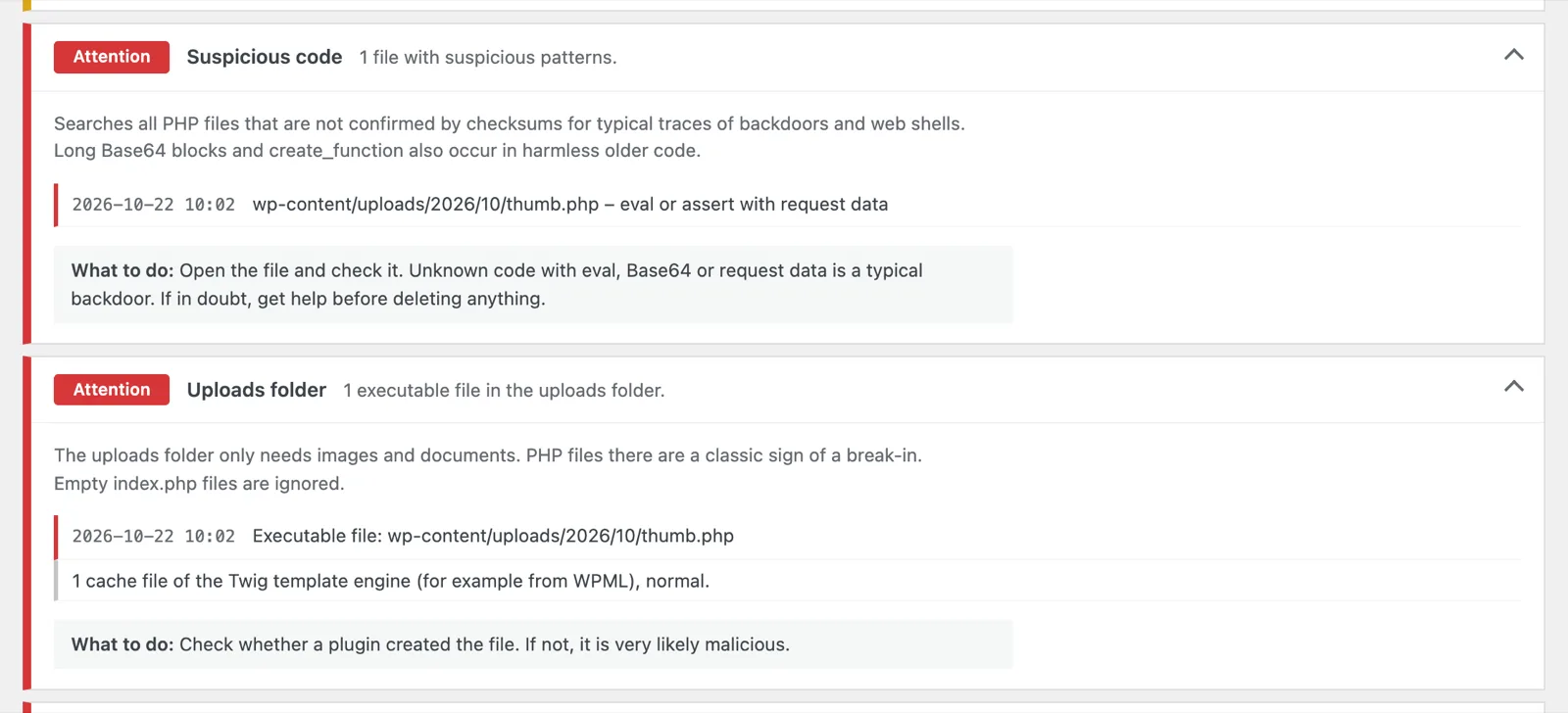
Expanded, a finding looks like this, for example: a PHP file in the uploads folder that runs code from requests. That’s a typical backdoor, and the plugin reports it twice: as suspicious code and as an executable file in the uploads folder.
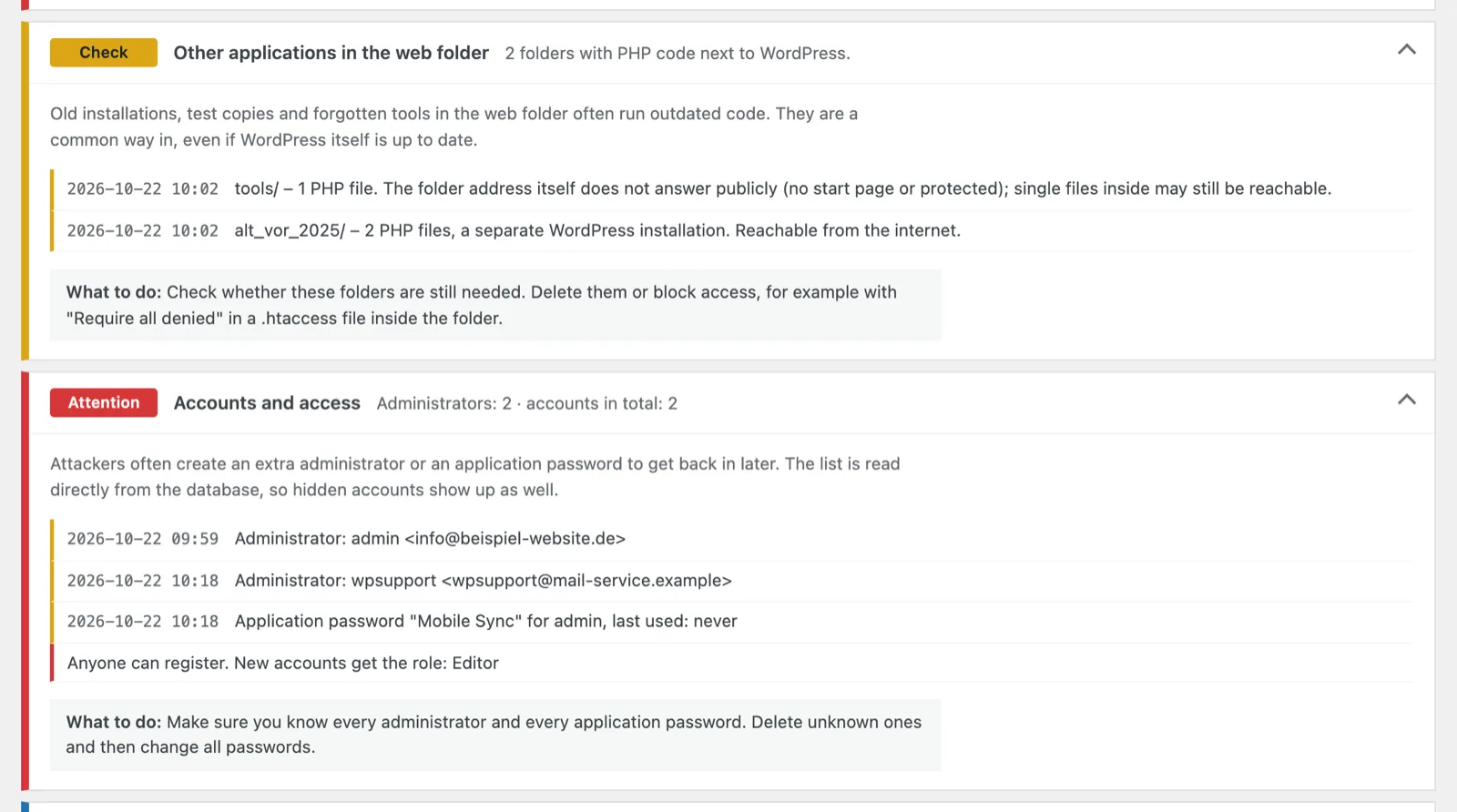
Leftovers and unknown access stand out in the same way: an old WordPress copy that can still be reached from the internet, and an administrator nobody created.
The page shows up to 50 entries per area. The downloadable report is a text file with all entries, for example for your web agency. With “Delete report” you remove it from your website again.
Install and run the check
Download
Download the plugin as a ZIP file (98 KB, version 1.0.1).
Install
In WordPress, go to “Plugins → Add Plugin → Upload Plugin”, choose the ZIP file, then install and activate the plugin. If your hosting provider is currently blocking file uploads because of PHP2Shell, this won’t work. In that case, unzip the file and upload the
realmaker-security-quick-checkfolder towp-content/pluginsvia SFTP or the file manager.Start the check
Open “Tools → Security Quick Check”, choose the period for the list of changes (7, 14, 30 or 90 days; 14 is preselected) and click “Start check”.
Read the report
Go through the report from top to bottom. Look at anything marked “Attention” first.
Delete the plugin
If you no longer need the plugin, delete it under “Plugins”. This also removes the stored report.
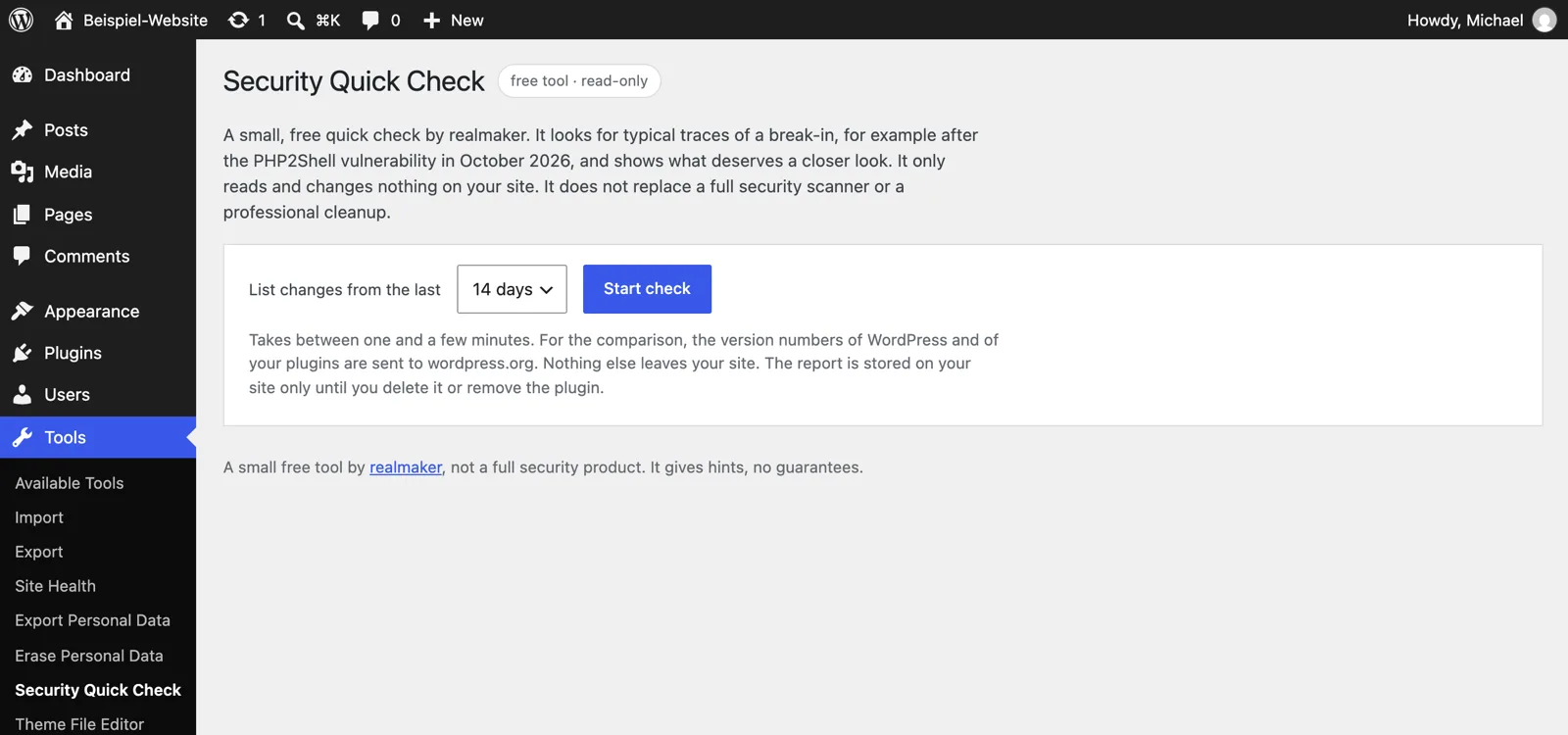
The check runs in steps of no more than eight seconds, so that it doesn’t hit time limits even on weak shared hosting. If it stops anyway, resume it with “Continue interrupted check”. On my test site with just over 4,000 files it took five seconds; large websites need a few minutes. The check also runs while your hosting provider temporarily blocks file uploads because of PHP2Shell. Only administrators can start it.
What the plugin can’t do
- It repairs nothing. It doesn’t delete, move or repair any files. You decide what happens with a finding.
- It is no proof. “No signs of a break-in found” is a good sign, but no guarantee. Malware on a site that has already been taken over can hide from tools running inside the same site.
- It detects typical patterns, not every piece of malware. Well-disguised or new code can slip through.
- It can’t compare everything. Premium plugins, custom plugins and themes have no official checksums. The search for suspicious code still covers them.
- It only sees your WordPress installation. It doesn’t check server logs, other websites outside the WordPress folder or the server itself. Only your hosting provider can do that.
Privacy: what leaves your website
For the comparison, the plugin requests the official checksums from wordpress.org. In doing so, the WordPress version and language go to api.wordpress.org, and the folder names and versions of your plugins go to downloads.wordpress.org. WordPress sends similar information during its update checks anyway. To check whether unknown folders can be reached from outside, the plugin also requests up to ten addresses on your own website. To recognize the server, it looks up the name of its own server address at the name server.
Nothing else leaves your website: no statistics, no account, no connection to realmaker. The report stays in your database until you delete it or remove the plugin. It contains the user names and email addresses of your administrators, so only share the downloaded file with people you would also trust with your website.
If the report finds something
Not every finding is a break-in. A plugin file you modified yourself, a tracking code in the settings or an old test copy in the web folder are often harmless – though you should remove the test copy anyway. Don’t delete anything in a hurry:
- First back up the current state, even if it may be infected. It helps with the investigation later.
- Then change the credentials: WordPress administrators, database, FTP and hosting.
- How to proceed step by step is covered in the PHP2Shell article, in the section How to check whether you have already been attacked.
Get support if you’re unsure. I’m happy to go through the report with you – get in touch.
Download
realmaker Security Quick Check 1.0.1
Download the plugin (ZIP, 98 KB)
For WordPress 6.3+ and PHP 7.4+ · tested up to WordPress 7.1 · licence GPL 2.0 or later · languages: English, German (informal) and German (formal)
Checksum (SHA-256): cf47b9e60e8e61e7
Version 1.0.1 of October 22, 2026: recognizes hosting providers that have applied the fix to all their servers as a backport by the server name, and the PHP check shows green there. The report now shows the server name.
Version 1.0.0 of October 22, 2026: first release.
Frequently asked questions about the Security Quick Check
Does the plugin slow down my website?
No. It only runs when you start the check, and then in short steps of a few seconds.
The report shows a changed plugin file. Has my website been hacked?
Not necessarily. If you or your agency modified the plugin, the difference is expected. Otherwise, reinstall the plugin from its original source.
Does the check work if my host blocks uploads because of PHP2Shell?
Yes. The check sends its requests without file uploads, so such a block doesn’t affect it. Only installing via “Upload Plugin” is blocked then. In that case, upload the unzipped folder via SFTP or the file manager.
Does the plugin have to stay installed?
No. Simply delete it after the check; this also removes the stored report.
Who can start the check?
Only administrators. The plugin isn’t visible to any other users.
Which languages is the plugin available in?
In English and German, in both the informal and the formal form. It follows the language of your WordPress installation.
Is the plugin available in the WordPress plugin directory?
No, for now only as a download here. That’s why it doesn’t update automatically. I publish new versions in this article.
Michael Rademacher
Founder of realmaker
Michael Rademacher founded realmaker in 2003. He develops WordPress websites and software, produces films and live streams, and writes here about what he learns in client projects.
About Michael
Rather have it maintained?
Updates, backups and monitoring are handled by wp-einfach.de – for a fixed monthly price (service in German).